The last step is the subtitle file you can actually use.
A subtitle is a sentence with a place in time. Editing the sentence is only useful if the change reaches the file that will be played, delivered or published.

A reviewer improves a subtitle line. The wording is clearer, the product name is correct, and the line now fits the scene.
Then someone downloads the original generated file instead of an export containing the edits. The review happened, but the audience never sees it.
A subtitle workflow needs a complete loop: import, localise, inspect, edit, regenerate and export. Nativ provides saved-file review and export operations alongside in-memory subtitle tools, so the last file in that loop can reflect the decisions made during review.
Keep the words connected to time
A subtitle cue contains text and timing. The timing connects that text to a spoken phrase, a scene or an action. Treating a subtitle as a loose list of strings loses that connection.
Start by checking the source file against the media. Inspect cue boundaries, speaker changes and names before translating. A transcription error that survives into several language versions becomes a harder problem to unwind.
Then check how the target language reads in the available time. A line can be accurate and too dense to read comfortably. A line break can separate words that should be understood together. Those are viewing decisions that require the video and captions to be considered together.
Know which subtitle path you are using
Nativ’s public tools distinguish in-memory subtitle parsing and localisation from saved subtitle files. Saved files have operations for upload, listing, review, review updates and export. The supported workflows include SRT and ITT, with differences between the available routes.
For saved subtitle work, use the format-specific flow exposed by the dashboard or public reference rather than assuming every endpoint accepts every format in the same way. In particular, the current saved-file localisation route has ITT-specific behaviour; SRT can use the supported upload-and-localise or in-memory paths.
A storage reference returned by a saved-file operation identifies an account-scoped file. It is not interchangeable with a local filesystem path or an arbitrary media URL.
Walk through the final delivery
- Prepare a short source subtitle and matching media. Include a name, a two-line cue and a speaker change so the test exercises real review decisions.
- Use the supported subtitle upload or localisation flow. Choose the target language and workspace context. Confirm that the file format is accepted by the path you are using.
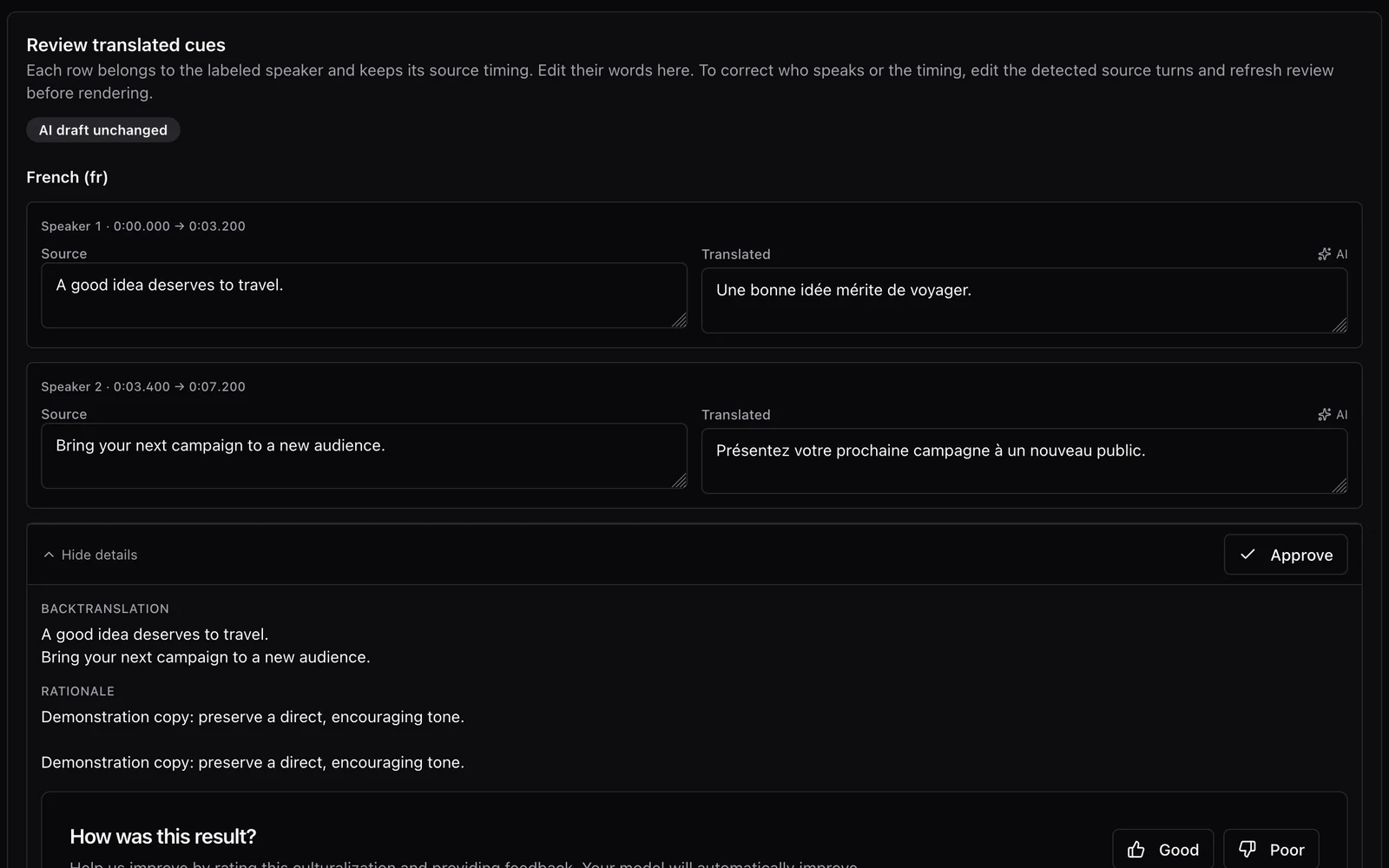
- Open the saved result in Files. Use the subtitle review surface to inspect source and translated rows, with the available quality-control information.
- Edit the language deliberately. Check terminology, reading order, punctuation and line breaks. Review the cue against the media rather than only reading a table.
- Export with the reviewed changes applied. The formatted subtitle download or regeneration step produces the deliverable. A QC workbook is a separate review artifact.
- Open the exported file in the destination player or editor. Check several edited cues and compare them with what you approved. Keep the source and final export identifiable.
For programmatic users, Nativ MCP exposes the same important distinction: update_subtitle_review saves review edits, and export_subtitle with regeneration applies them to the exported subtitle. Requesting QC output produces the review workbook instead of the subtitle deliverable.
Use review information for the right job
Backtranslation and rationale can help someone understand a language choice. Approval fields can help a team organise its review. Neither checks whether the viewer can read the caption before the shot changes.
Inspect the final viewing experience. Are captions covering important text? Does a speaker change remain understandable? Does punctuation reflect the delivery? Check the player or editor’s actual handling of the exported format, especially where styling is important.
For spoken language versions, continue with the speaker-dubbing workflow. For the wider relationship between picture, sound and written language, see why a film is more than its soundtrack.
The handoff is complete when the file you deliver contains the words you reviewed at the times the viewer needs them.
Product references
A conversation needs more than one translated voice.
Prepare speaker-aware dubbing with Nativ: inspect the transcript, assign voices, review translated turns and timing, and listen to the finished mix.

A film is more than its soundtrack.
Inside the Nativ Video workflow: transcription, script review, voices, timing and the creative layers that make a film feel local.